Digital Document Camera

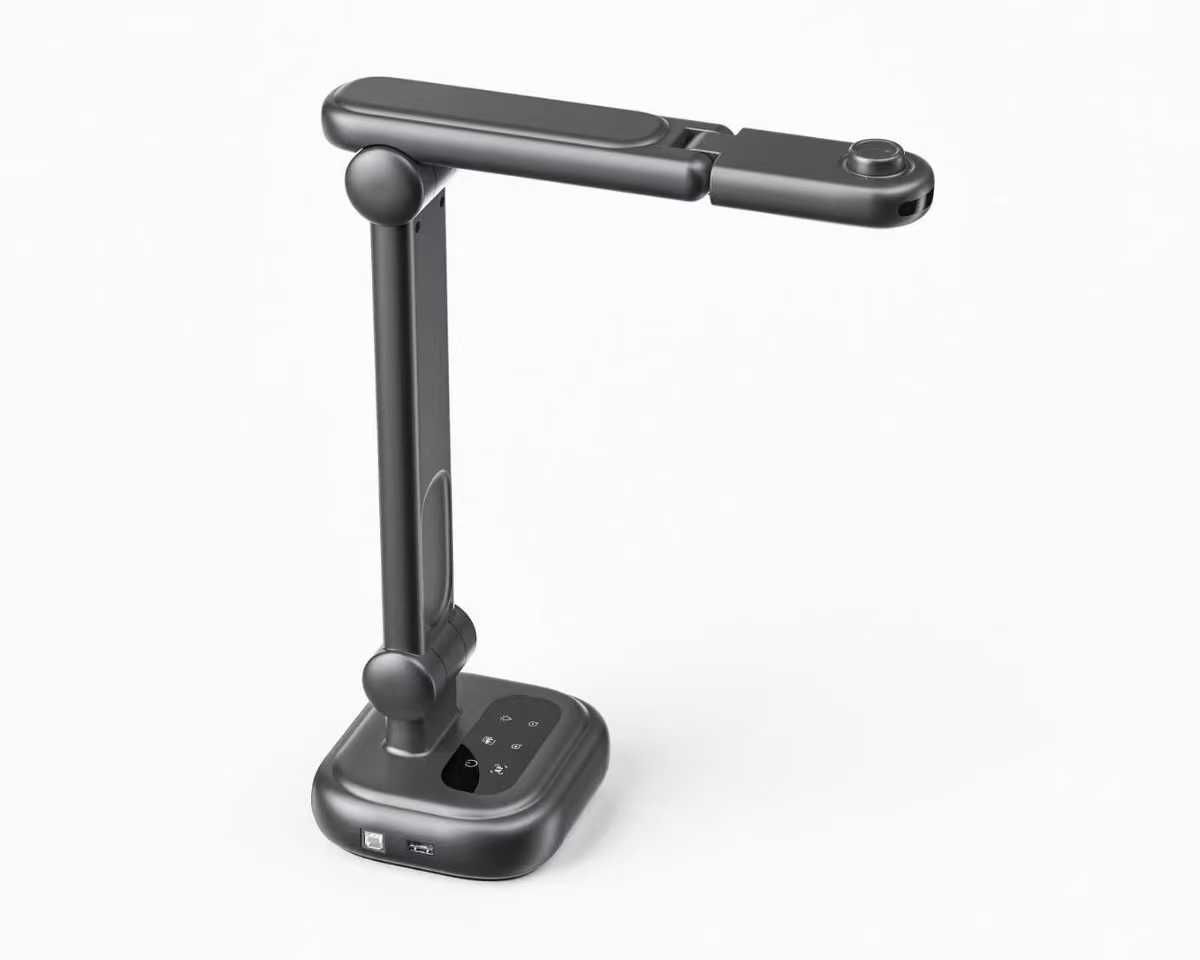
A digital document camera that shows A4 documents, printed materials, drawings and three-dimensional objects to the whole class in real time through a projector, interactive panel or the teacher's computer. For K-12 teachers across science, technology, mathematics and geography lessons.

Thank you! Your submission has been received!
Oops! Something went wrong while submitting the form.

Specification

icon plus
  • Purpose: real-time visualisation and broadcasting of images of flat documents, drawings and three-dimensional objects
  • Document format: A4
  • Resolution: 1920 x 1080 pixels (1080p)
  • Focusing: autofocus or manual
  • Illumination: built-in, for even lighting of the document
  • Connection interfaces: HDMI and USB
  • Camera adjustment: tilt angle adjustment of the camera on the bracket
  • Operating modes: real-time image broadcasting, video recording
  • Compatibility: teacher's computer, multimedia projector, interactive panel
  • Software: supplied in the set, Ukrainian-language interface, compatible with the operating system of the teacher's personal computer
  • Recommended age: learners from 10 years (grade 5 and above), under teacher supervision
  • Conformity: CE and WEEE marking

Product passport: ULABS-UN-DE-1013 (PDF)

Additional info

icon plus

Additional Information

Setup
  • Inspect the housing, bracket, hinges, lens and connection cables; remove the protective film from the lens before the first switch-on
  • Place the product on a stable level surface of the teacher's desk so that an A4 document fits under the camera and the bracket does not overhang the edge of the table
  • Unfold the bracket, position the camera above the working surface and point the lens downwards
  • Connect by HDMI cable to a multimedia projector or interactive panel, or by USB cable to the teacher's computer
  • Install the supplied software with Ukrainian-language interface and confirm that the camera image appears in the program window
  • Set the frame and focus before the lesson: place an A4 sheet under the camera, adjust the camera tilt and bracket height until the sheet fits the frame without edge distortion, then focus by autofocus or manually
Demonstration
  • Place the document under the camera evenly and check the image on the projector or panel before drawing the class's attention to it
  • Enlarge small text or a drawing with the software rather than lifting the document towards the lens
  • Place three-dimensional objects in the centre of the frame and rotate them slowly so that autofocus can settle; switch to manual focus and lock it if focus drifts
  • Switch the built-in illumination on when little light falls on the document, and off when it produces glare on glossy paper
  • Keep your hand beside the document rather than above it, so it does not block the image or upset autofocus
Recording and Live Broadcasting
  • The product transmits the image in real time and records video
  • Check free space on the computer and refocus before recording; do not move the product or change the camera tilt while recording
  • The supplied software allows viewing the recording, capturing a single frame and transferring the image into a document or presentation
  • Stop the broadcast or recording and close the program before disconnecting the cables
Operating Conditions
  • Air temperature: +5 °C to +40 °C
  • Relative humidity: 40 % to 60 %
  • Atmospheric pressure: 84 to 107 kPa (630-800 mm Hg)
Safety
  • Students work with the product under the supervision of a teacher
  • Do not direct the built-in illumination into students' eyes and do not look at the LEDs from a short distance
  • Install the product so that the bracket with the camera does not overhang the edge of the table: a tipped device falls lens down and fails
  • Change the camera tilt and bracket position smoothly, only within the limits provided by the design, without forcing the hinges
  • Route the HDMI and USB cables so that they do not cross walkways, hang in loops from the table or drag the product
  • Do not touch the lens with your fingers and do not place hot objects, open vessels with liquid or reagents under the camera
  • Do not disassemble the housing and do not expose the product to impacts, moisture or direct sunlight
Maintenance
  • Clean the lens with a soft optics wipe, slightly dampened if required; blow dust off or remove it with a soft brush, and never wipe the lens dry with paper or a linting cloth
  • Wipe the housing and bracket with a soft damp cloth, without solvents or abrasives; do not let liquid enter the connectors
  • Check the condition of the HDMI and USB cables, the reliability of the connectors and the movement of the bracket hinges periodically; replace a hinge that does not hold its position and a cable with damaged insulation
Storage and Transport
  • Store in a dry, clean, ventilated room at +5 °C to +40 °C and relative humidity of 60 % without condensation, protected from direct sunlight, moisture, dust and heat sources
  • Store with the bracket folded, in the box or covered from dust, lens down on a soft pad
  • Let a product brought in from the cold stand indoors until condensation disappears before switching it on
  • During transport the packed product is secured so that it cannot shift, and the packaging is protected from precipitation and impact
Warranty and Disposal
  • Warranty: remedy of defects and replacement of defective parts or of the equipment for three (3) years; availability of spare parts and consumables for five (5) years
  • Disposal: WEEE marking - not to be disposed of with unsorted household waste; hand the product over to a separate collection point for waste electrical and electronic equipment. Metal parts are recycled as scrap metal, electronic components go to specialised processing

icon plus
How long is the MIKKO Course?
Is the MIKKO Course good for new teachers
How long is the MIKKO Course?
Ask something?
More information

More information

Related products
view all

What our clients are saying about us.
view all

Customer testimonials

What our clients are saying about us.

Working with UNOWA was a turning point for our university. Their expert-led training in ABA, ADOS-2 and MIKKO reshaped how we think, teach, and prepare inclusive educators. The model inclusion classroom they equipped has become a living lab, a space where theory becomes hands-on skill. This partnership didn’t just support a project. It laid the foundation for a more humane, modern and inclusive education system in Kazakhstan.
Yerkin Zhumankulova
Vice-Rector in Academic Affairs. Kazakh National Women's Teacher Training University
Thanks to UNOWA’s innovative approach and professional guidance, we’ve redefined how we prepare future educators. The MIKKO training and inclusion lab brought international best practices to our university, not just as theory, but as living, hands-on tools that inspire confidence and real change.
Irina Rovnyakova
Vice-Rector for Strategic Development and International Relations. Sarsen Amanzholov East Kazakhstan University
Working with the UNOWA team was a valuable and supportive experience in delivering psychological and educational projects. Their reliable platform, openness to dialogue, and continuous technical support allowed me to focus on the quality and meaning of education. I confidently recommend UNOWA as a trusted partner for the development of psychological education and human-centered support.
Liudmyla Lahuta
President of the International Institute of Psychological Maturity INC
Thanks to our partnership with UNOWA, even schools in Armenia’s most remote regions now have access to fully equipped science and technology labs. Nearly half of the country’s schools have been modernized, bringing equal learning conditions to every student, no matter where they live.
Zhanna Andreasyan
Minister of Education, Science, Culture and Sport. The Government of the Republic of Armenia
UNOWA's national project equipped 14 Kazakhstan universities with inclusive classrooms to a unified standard. They delivered top-quality kits, equipment, digital courses with 24/7 access, and localized resources. This game-changer strengthened inclusive education foundations nationwide.
Dastan Yessenov
Coordinator of the PIU of World Bank in the Republic of Kazakhstan
UNOWA's national-level ABA and ADOS-2 training became a milestone for Kazakhstan's education system. The program was comprehensive, well-structured, and perfectly aligned with inclusive education modernization goals nationwide. I appreciated the balance of deep theory, practical sessions, and 24/7 online access. This strengthened specialists' ABA and diagnostics skills, directly improving support for children with special needs.
Karlygash Zholdassova
Inclusion Education Specialist of PIU of World Bank in the Republic of Kazakhstan
icon arrow left
icon arrow right

Customer testimonials

What our clients are saying about us.

UNOWA's national project equipped 14 Kazakhstan universities with inclusive classrooms to a unified standard. They delivered top-quality kits, equipment, digital courses with 24/7 access, and localized resources. This game-changer strengthened inclusive education foundations nationwide.
Dastan Yessenov
Coordinator of the PIU of World Bank in the Republic of Kazakhstan
UNOWA's national-level ABA and ADOS-2 training became a milestone for Kazakhstan's education system. The program was comprehensive, well-structured, and perfectly aligned with inclusive education modernization goals nationwide. I appreciated the balance of deep theory, practical sessions, and 24/7 online access. This strengthened specialists' ABA and diagnostics skills, directly improving support for children with special needs.
Karlygash Zholdassova
Inclusion Education Specialist of PIU of World Bank in the Republic of Kazakhstan
Working with the UNOWA team was a valuable and supportive experience in delivering psychological and educational projects. Their reliable platform, openness to dialogue, and continuous technical support allowed me to focus on the quality and meaning of education. I confidently recommend UNOWA as a trusted partner for the development of psychological education and human-centered support.
Liudmyla Lahuta
President of the International Institute of Psychological Maturity INC
Thanks to our partnership with UNOWA, even schools in Armenia’s most remote regions now have access to fully equipped science and technology labs. Nearly half of the country’s schools have been modernized, bringing equal learning conditions to every student, no matter where they live.
Zhanna Andreasyan
Minister of Education, Science, Culture and Sport. The Government of the Republic of Armenia
Thanks to UNOWA’s innovative approach and professional guidance, we’ve redefined how we prepare future educators. The MIKKO training and inclusion lab brought international best practices to our university, not just as theory, but as living, hands-on tools that inspire confidence and real change.
Irina Rovnyakova
Vice-Rector for Strategic Development and International Relations Sarsen Amanzholov East Kazakhstan University
Working with UNOWA was a turning point for our university. Their expert-led training in ABA, ADOS-2 and MIKKO reshaped how we think, teach, and prepare inclusive educators. The model inclusion classroom they equipped has become a living lab, a space where theory becomes hands-on skill. This partnership didn’t just support a project. It laid the foundation for a more humane, modern and inclusive education system in Kazakhstan.
Yerkin Zhumankulova
Vice-Rector in Academic Affairs Kazakh National Women's Teacher Training University
icon arrow left
icon arrow right
Digital Document Camera
Speak to expertimage of finger pointing to a graph