3D Scanner

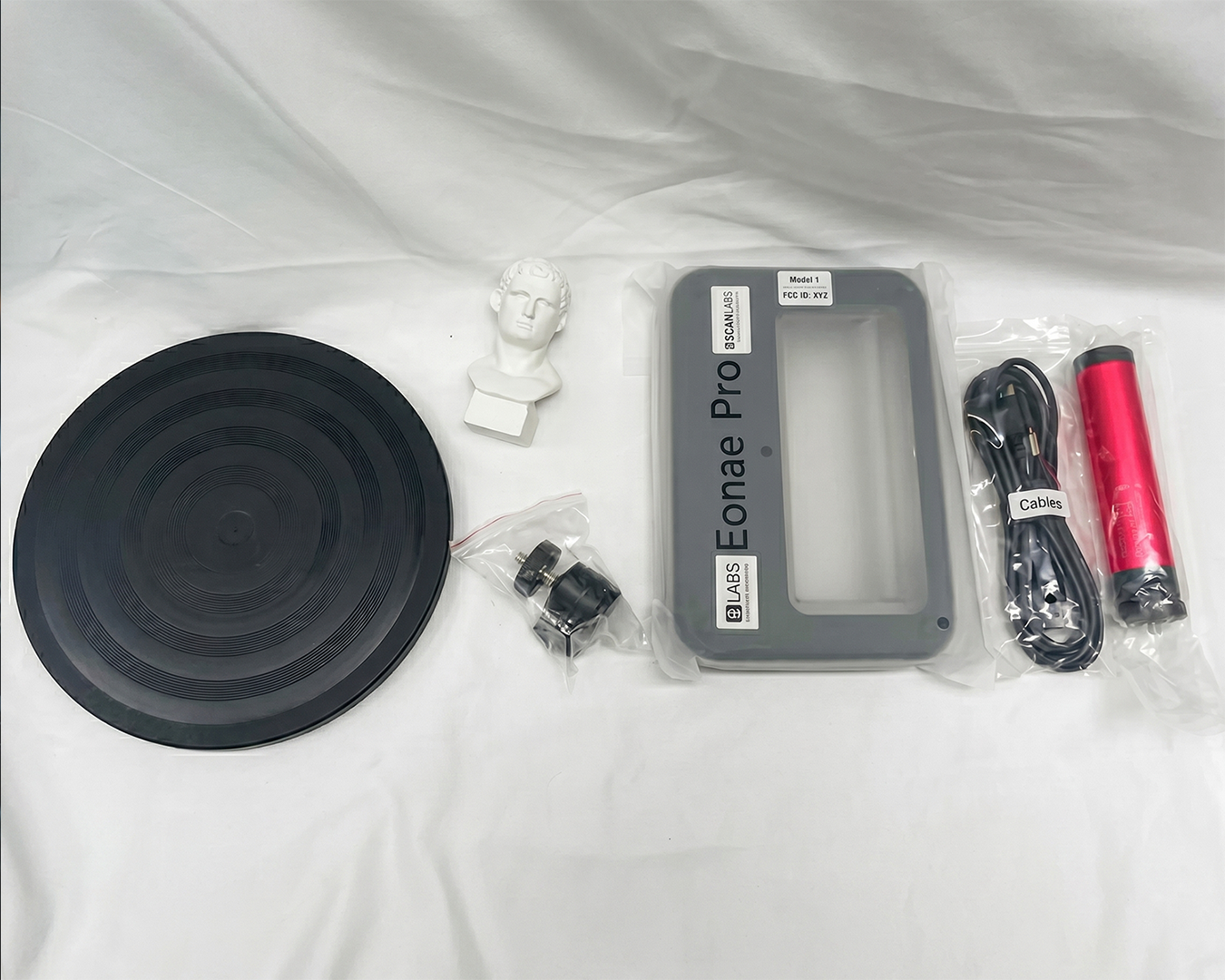
A portable 3D scanner that captures the geometry of small and medium objects and builds three-dimensional models of them on a computer. Intended for K-12 lessons in computer science, technology and the basics of engineering, under the supervision of a teacher.

Thank you! Your submission has been received!
Oops! Something went wrong while submitting the form.

Specification

icon plus
  • Scanning technology: structured infrared light, eye-safe
  • Single-frame scanning accuracy: 0.1 mm
  • Resolution: 0.5–1.5 mm
  • Scanning speed: 10–30 frames per second
  • Small objects: 50 × 50 × 50 mm
  • Medium objects: 300 × 300 × 300 mm
  • Scanning modes: handheld and automatic (with a turntable)
  • Output file formats: STL, OBJ, PLY; the files open in common 3D modelling and 3D print preparation software
  • Connection to a personal computer: USB cable
  • Optical system: binocular, fixed-focus lenses of 8 elements each, optical filter with 99 % transmittance
  • Infrared illumination power: 0.4 mW
  • Operating conditions: air temperature +5 °C to +40 °C, relative humidity 40–60 %, atmospheric pressure 84–107 kPa
  • Warranty: 3 years; spare parts and consumables available for 5 years
  • Compliance: CE and WEEE marking

Kit Contents:

  • Portable scanner, binocular optical system with infrared illumination — 1 pc
  • Connection cable, USB connection to a personal computer — 1 pc
  • Stand (holder), holds the scanner in a fixed position — 1 pc
  • Software, scanning control and 3D model reconstruction — 1 set

The bundled software captures frames, automatically merges individual scans into one model, optimises the polygon mesh and aligns the model to the base plane. A finished model is saved as STL when it is prepared for 3D printing, or as OBJ and PLY when surface and colour data are to be kept for further editing.

Product passport: ULABS-S002 (PDF)

Additional info

icon plus

Intended use

  • For general secondary education institutions, used only under the control and supervision of a teacher.
  • Recommended for learners aged 10 and over (grade 5 and above).

Preparation and operation

  • Install the bundled software on the computer, then connect the scanner with the USB cable and wait until the program detects the device.
  • Place the object on a flat single-colour surface in diffused light, away from direct sunlight and powerful lamps aimed at the object, leaving free space around it.
  • Small objects of 50 × 50 × 50 mm are captured with the scanner fixed on the stand while the object itself is rotated; medium objects of 300 × 300 × 300 mm are scanned by moving the scanner around the object by hand.
  • Mirrored, transparent and glossy black surfaces reflect or absorb the illumination and are captured incompletely; such objects are first coated with a thin layer of a matting agent approved for that surface.
  • Move the scanner smoothly: at 10 to 30 frames per second an abrupt movement breaks the frame sequence and the model splits into separate fragments.
  • Overlap each new area with the previous one and vary the tilt angle, otherwise unscanned zones remain under overhangs and in recesses. In automatic mode the object is turned on the turntable and, after the first revolution, flipped over and scanned again.
  • Finish by merging the scans, optimising the mesh and aligning the model, then save the result as STL, OBJ or PLY. For printing, the model is additionally checked for a closed surface.
  • Finer relief details are not reproduced: single-frame accuracy is 0.1 mm and resolution is 0.5–1.5 mm, and no software setting overcomes this limit.

Safety

  • Do not point the emitter at the eyes of people or animals and do not look into it from a short distance: the illumination is infrared and eye-safe at a power below 0.4 mW, but prolonged exposure to a directed beam at close range is not permitted.
  • Before first use, check the optical radiation class marking on the housing and follow the requirements stated there and in the manufacturer's documentation.
  • Do not open the housing and do not remove the optical filter or the protective glass of the lenses: this disturbs the alignment of the binocular system and gives direct access to the emitter.
  • Connect and disconnect the USB cable by holding the connector body, and only while scanning is inactive; do not extend the cable with improvised joints.
  • Do not leave the product in direct sunlight or near heaters and powerful light sources: external infrared radiation distorts the scan and heating damages the optical assembly.
  • Do not scan self-propelled moving objects, or hot, wet and liquid-covered surfaces.
  • Students work with the product under the supervision of a teacher.

Maintenance

  • Clean the optical windows of the lenses and the emitter only with an optics wipe lightly moistened with optics cleaner. Blow dust off with a blower first: dry wiping of dusty glass leaves scratches, and a scratched window permanently reduces capture accuracy. Abrasives, excess alcohol and household detergents are not used.
  • Clean the housing with a soft dry cloth. Liquid must not enter the USB connector or the ventilation slots; the product is not immersed in water or rinsed under running water.
  • Inspect the cable and connector: a break in the insulation next to the connector is the most frequent cause of failure during scanning. A damaged cable is replaced, not repaired with insulating tape.
  • Update the bundled software periodically to the version recommended by the manufacturer and keep the installation package together with the product documentation.

Storage and transport

  • Store in a dry, clean, ventilated room at +5 °C to +40 °C and relative humidity of 60 %, without condensation, protected from direct sunlight, moisture, dust and heat sources.
  • Between lessons keep the scanner in its case, in a dry heated room, away from heavy objects. Transport it with the cable disconnected.
  • The storage room air is kept free of impurities that cause corrosion of metals.

Disposal

  • The product carries the WEEE marking (crossed-out wheeled bin), which prohibits disposal together with unsorted household waste.
  • A product no longer fit for use is handed over to the appropriate collection point for waste electrical and electronic equipment. Metal parts are recycled as scrap metal; electronic components go to specialised recycling.

icon plus
How long is the MIKKO Course?
Is the MIKKO Course good for new teachers
How long is the MIKKO Course?
Ask something?
More information

More information

Related products
view all

What our clients are saying about us.
view all

Customer testimonials

What our clients are saying about us.

Working with UNOWA was a turning point for our university. Their expert-led training in ABA, ADOS-2 and MIKKO reshaped how we think, teach, and prepare inclusive educators. The model inclusion classroom they equipped has become a living lab, a space where theory becomes hands-on skill. This partnership didn’t just support a project. It laid the foundation for a more humane, modern and inclusive education system in Kazakhstan.
Yerkin Zhumankulova
Vice-Rector in Academic Affairs. Kazakh National Women's Teacher Training University
Thanks to UNOWA’s innovative approach and professional guidance, we’ve redefined how we prepare future educators. The MIKKO training and inclusion lab brought international best practices to our university, not just as theory, but as living, hands-on tools that inspire confidence and real change.
Irina Rovnyakova
Vice-Rector for Strategic Development and International Relations. Sarsen Amanzholov East Kazakhstan University
Working with the UNOWA team was a valuable and supportive experience in delivering psychological and educational projects. Their reliable platform, openness to dialogue, and continuous technical support allowed me to focus on the quality and meaning of education. I confidently recommend UNOWA as a trusted partner for the development of psychological education and human-centered support.
Liudmyla Lahuta
President of the International Institute of Psychological Maturity INC
Thanks to our partnership with UNOWA, even schools in Armenia’s most remote regions now have access to fully equipped science and technology labs. Nearly half of the country’s schools have been modernized, bringing equal learning conditions to every student, no matter where they live.
Zhanna Andreasyan
Minister of Education, Science, Culture and Sport. The Government of the Republic of Armenia
UNOWA's national project equipped 14 Kazakhstan universities with inclusive classrooms to a unified standard. They delivered top-quality kits, equipment, digital courses with 24/7 access, and localized resources. This game-changer strengthened inclusive education foundations nationwide.
Dastan Yessenov
Coordinator of the PIU of World Bank in the Republic of Kazakhstan
UNOWA's national-level ABA and ADOS-2 training became a milestone for Kazakhstan's education system. The program was comprehensive, well-structured, and perfectly aligned with inclusive education modernization goals nationwide. I appreciated the balance of deep theory, practical sessions, and 24/7 online access. This strengthened specialists' ABA and diagnostics skills, directly improving support for children with special needs.
Karlygash Zholdassova
Inclusion Education Specialist of PIU of World Bank in the Republic of Kazakhstan
icon arrow left
icon arrow right

Customer testimonials

What our clients are saying about us.

UNOWA's national project equipped 14 Kazakhstan universities with inclusive classrooms to a unified standard. They delivered top-quality kits, equipment, digital courses with 24/7 access, and localized resources. This game-changer strengthened inclusive education foundations nationwide.
Dastan Yessenov
Coordinator of the PIU of World Bank in the Republic of Kazakhstan
UNOWA's national-level ABA and ADOS-2 training became a milestone for Kazakhstan's education system. The program was comprehensive, well-structured, and perfectly aligned with inclusive education modernization goals nationwide. I appreciated the balance of deep theory, practical sessions, and 24/7 online access. This strengthened specialists' ABA and diagnostics skills, directly improving support for children with special needs.
Karlygash Zholdassova
Inclusion Education Specialist of PIU of World Bank in the Republic of Kazakhstan
Working with the UNOWA team was a valuable and supportive experience in delivering psychological and educational projects. Their reliable platform, openness to dialogue, and continuous technical support allowed me to focus on the quality and meaning of education. I confidently recommend UNOWA as a trusted partner for the development of psychological education and human-centered support.
Liudmyla Lahuta
President of the International Institute of Psychological Maturity INC
Thanks to our partnership with UNOWA, even schools in Armenia’s most remote regions now have access to fully equipped science and technology labs. Nearly half of the country’s schools have been modernized, bringing equal learning conditions to every student, no matter where they live.
Zhanna Andreasyan
Minister of Education, Science, Culture and Sport. The Government of the Republic of Armenia
Thanks to UNOWA’s innovative approach and professional guidance, we’ve redefined how we prepare future educators. The MIKKO training and inclusion lab brought international best practices to our university, not just as theory, but as living, hands-on tools that inspire confidence and real change.
Irina Rovnyakova
Vice-Rector for Strategic Development and International Relations Sarsen Amanzholov East Kazakhstan University
Working with UNOWA was a turning point for our university. Their expert-led training in ABA, ADOS-2 and MIKKO reshaped how we think, teach, and prepare inclusive educators. The model inclusion classroom they equipped has become a living lab, a space where theory becomes hands-on skill. This partnership didn’t just support a project. It laid the foundation for a more humane, modern and inclusive education system in Kazakhstan.
Yerkin Zhumankulova
Vice-Rector in Academic Affairs Kazakh National Women's Teacher Training University
icon arrow left
icon arrow right
3D Scanner
Speak to expertimage of finger pointing to a graph